🇪🇸 Español
Pixiv Encyclopedia Viewer History Extractor




🇺🇸 English | 🇮🇳 हिंदी | 🇯🇵 日本語 | 🇨🇳 简体中文 | 🇪🇸 Español | 🇧🇷 Português (Brasil) | 🇰🇷 한국어 | 🇩🇪 Deutsch | 🇫🇷 Français
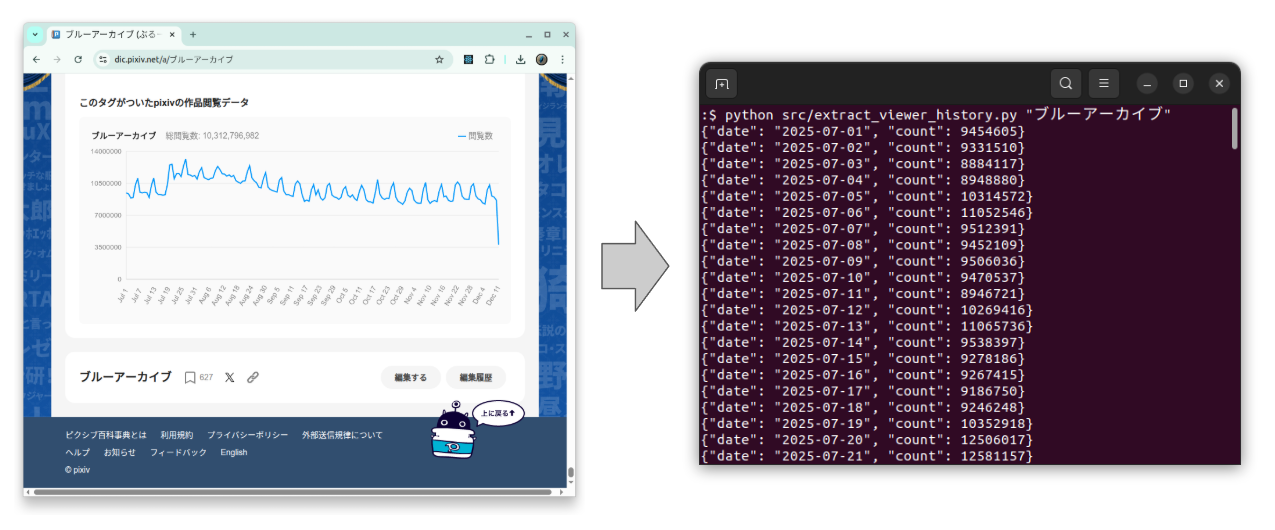
Una herramienta de extracción para Pixiv Encyclopedia Viewer Count History
README en japonés
La versión en japonés está aquí: README.ja.md.
Descripción general
Extrae datos diarios del historial de visualizaciones de un artículo de Pixiv Encyclopedia (pixiv百科事典).
El historial de visualizaciones de Pixiv Encyclopedia es un buen dataset de series temporales del mundo real.
A menudo muestra:
- Estacionalidad semanal (weekday vs weekend traffic)
- Spikes ocasionales causados por events o social media buzz
Puedes usar el CSV extraído como sample data para:
- Time-series visualization y smoothing
- Seasonal decomposition
- Forecasting models (ARIMA, Prophet, etc.)
⚠️ Tool no oficial
Este project no está afiliado a Pixiv ni cuenta con su endorsement.
Sigue Pixiv’s Terms of Use y robots.txt al usar este script.
Características
- Fetch directamente desde Pixiv Encyclopedia por article title (e.g.,
"ブルーアーカイブ") - O lectura desde un local HTML file
- Output de JSON Lines a stdout
(un{"date": "...","count": ...}por línea) - CSV export opcional mediante
--csv output.csv
Requisitos
- Python 3.9+
- Dependencies:
requestsbeautifulsoup4
Uso
0. Crear virtual environment
python3 -m venv env
source env/bin/activate
pip install -r requirements.txt
1. Fetch por article title
python src/extract_viewer_history.py "ブルーアーカイブ"
Esto hará lo siguiente:
- Descargar
https://dic.pixiv.net/a/ブルーアーカイブ - Parsear el embedded JSON
- Print de un JSON object por línea en stdout:
{"date": "2025-07-01", "count": 9454605}
{"date": "2025-07-02", "count": 9331510}
{"date": "2025-07-03", "count": 8884117}
...
Puedes redirigirlo a un file:
python src/extract_viewer_history.py "ブルーアーカイブ" > ブルーアーカイブ.jsonl
2. Export as CSV
Usa la option --csv para escribir un CSV file mientras sigues imprimiendo JSON en stdout:
python src/extract_viewer_history.py "ブルーアーカイブ" --csv ブルーアーカイブ.csv
Ejemplo de CSV content:
date,count
2025-07-01,9454605
2025-07-02,9331510
2025-07-03,8884117
...
3. Usar un local HTML file
Si ya has guardado el article HTML:
python src/extract_viewer_history.py ブルーアーカイブ.html
python src/extract_viewer_history.py ブルーアーカイブ.html --csv ブルーアーカイブ.csv
El script detectará que ブルーアーカイブ.html es un file y lo parseará en lugar de hacer fetch desde la web.
4. Test
pip install -r requirements.test.txt
pytest
5. Deactivate environment
deactivate
Notes / Limitations
- No hay rate limiting implementado; por favor:
- Úsalo de forma responsable
- Evita enviar muchas requests en poco tiempo
- Este es un utility script sencillo, pensado principalmente para personal analysis o research.
License
- Apache License 2.0