🇩🇪 Deutsch
Pixiv Encyclopedia Viewer History Extractor




🇺🇸 English | 🇮🇳 हिंदी | 🇯🇵 日本語 | 🇨🇳 简体中文 | 🇪🇸 Español | 🇧🇷 Português (Brasil) | 🇰🇷 한국어 | 🇩🇪 Deutsch | 🇫🇷 Français
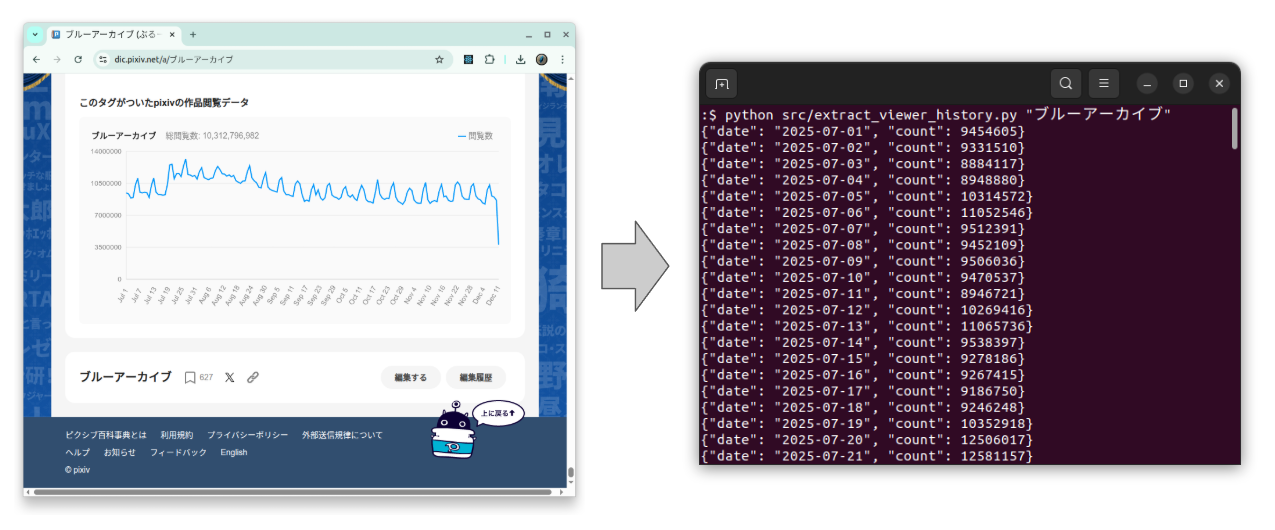
Ein Extraktionstool für Pixiv Encyclopedia Viewer Count History
Japanisches README
Die japanische Version findest du hier: README.ja.md.
Überblick
Extrahiere tägliche View-History-Daten aus einem Artikel der Pixiv Encyclopedia (pixiv百科事典).
Die Pixiv Encyclopedia viewer history ist ein nützliches reales time-series dataset.
Sie zeigt häufig:
- Wöchentliche seasonality (weekday vs weekend traffic)
- Gelegentliche spikes, ausgelöst durch events oder social media buzz
Du kannst die extrahierte CSV als sample data verwenden für:
- Time-series visualization und smoothing
- Seasonal decomposition
- Forecasting models (ARIMA, Prophet, etc.)
⚠️ Inoffizielles tool
Dieses project ist weder mit Pixiv verbunden noch von Pixiv endorsed.
Bitte beachte Pixiv’s Terms of Use und robots.txt, wenn du dieses script verwendest.
Features
- Direktes Fetch aus der Pixiv Encyclopedia per article title (e.g.,
"ブルーアーカイブ") - Oder Lesen aus einer local HTML file
- Ausgabe von JSON Lines nach stdout
(ein{"date": "...","count": ...}pro Zeile) - Optionaler CSV export über
--csv output.csv
Anforderungen
- Python 3.9+
- Dependencies:
requestsbeautifulsoup4
Nutzung
0. virtual environment erstellen
python3 -m venv env
source env/bin/activate
pip install -r requirements.txt
1. Per article title fetch
python src/extract_viewer_history.py "ブルーアーカイブ"
Dies wird:
https://dic.pixiv.net/a/ブルーアーカイブherunterladen- Das embedded JSON parsen
- Ein JSON object pro Zeile nach stdout printen:
{"date": "2025-07-01", "count": 9454605}
{"date": "2025-07-02", "count": 9331510}
{"date": "2025-07-03", "count": 8884117}
...
Du kannst die Ausgabe in eine file redirecten:
python src/extract_viewer_history.py "ブルーアーカイブ" > ブルーアーカイブ.jsonl
2. Export as CSV
Verwende die option --csv, um eine CSV file zu schreiben und gleichzeitig JSON weiterhin nach stdout zu printen:
python src/extract_viewer_history.py "ブルーアーカイブ" --csv ブルーアーカイブ.csv
Beispiel für CSV content:
date,count
2025-07-01,9454605
2025-07-02,9331510
2025-07-03,8884117
...
3. Eine local HTML file verwenden
Wenn du den article HTML bereits gespeichert hast:
python src/extract_viewer_history.py ブルーアーカイブ.html
python src/extract_viewer_history.py ブルーアーカイブ.html --csv ブルーアーカイブ.csv
Das script erkennt, dass ブルーアーカイブ.html eine file ist, und parst diese, anstatt sie aus dem Web zu fetchen.
4. Test
pip install -r requirements.test.txt
pytest
5. Environment deaktivieren
deactivate
Notes / Limitations
- Es ist kein rate limiting implementiert; bitte:
- Verwende es verantwortungsbewusst
- Vermeide es, in kurzer Zeit viele requests zu senden
- Dies ist ein einfaches utility script, das hauptsächlich für personal analysis oder research gedacht ist.
License
- Apache License 2.0