🇮🇳 हिंदी
pose_estimation





🇺🇸 English | 🇮🇳 हिंदी | 🇯🇵 日本語 | 🇨🇳 简体中文 | 🇪🇸 Español | 🇧🇷 Português (Brasil) | 🇰🇷 한국어 | 🇩🇪 Deutsch | 🇫🇷 Français
[!NOTE] यह README का अनुवादित संस्करण है। अंग्रेज़ी संस्करण source of truth है।
2D छवियों से pose estimation के लिए एक container।
Pose-to-VRM bone mapping
backend BODY_25-style pose keypoints और bone pairs लौटाता है। MediaPipe mode में, Neck को LShoulder और RShoulder से synthesized किया जाता है, और MidHip को LHip और RHip से synthesized किया जाता है। अनुमानित pose को VRM humanoid skeleton में transfer करते समय नीचे दी गई table का उपयोग करें।
| Estimated pose vector | Input keypoints | VRM humanoid bone | Priority | Notes |
|---|---|---|---|---|
| Body root | MidHip, LHip, RHip |
hips |
Required | मुख्य रूप से root rotation के लिए उपयोग करें। single image से root translation पर भरोसा करने से बचें। |
| Spine | MidHip -> Neck |
spine |
Required | upper body की मुख्य दिशा। |
| Chest | MidHip -> Neck |
chest |
Recommended | exaggerated bending से बचने के लिए इसे spine से कम weight के साथ लागू करें। |
| Upper chest | MidHip -> Neck |
upperChest |
Optional | केवल तब उपयोग करें जब loaded VRM model में यह bone हो। |
| Neck | Neck -> Nose |
neck |
Recommended | single-image pose estimation में head और neck landmarks noisy होते हैं, इसलिए इसे हल्के ढंग से लागू करें। |
| Head | Neck -> Nose, Nose -> LEye, Nose -> REye, LEye -> LEar, REye -> REar |
head |
Recommended | simple fallback केवल Neck -> Nose का उपयोग कर सकता है; eye और ear points facing direction को बेहतर बना सकते हैं। |
| Left shoulder | Neck -> LShoulder |
leftShoulder |
Optional | केवल तब उपयोग करें जब VRM में shoulder bones हों। arm को इस bone के बिना भी drive किया जा सकता है। |
| Left upper arm | LShoulder -> LElbow |
leftUpperArm |
Required | primary left upper-arm rotation। |
| Left lower arm | LElbow -> LWrist |
leftLowerArm |
Required | primary left forearm rotation। |
| Left hand | LElbow -> LWrist or hand landmarks |
leftHand |
Optional | BODY_25 wrist orientation के लिए पर्याप्त जानकारी नहीं देता। hand landmarks उपलब्ध न हों तो weak fallback का उपयोग करें। |
| Right shoulder | Neck -> RShoulder |
rightShoulder |
Optional | केवल तब उपयोग करें जब VRM में shoulder bones हों। |
| Right upper arm | RShoulder -> RElbow |
rightUpperArm |
Required | primary right upper-arm rotation। |
| Right lower arm | RElbow -> RWrist |
rightLowerArm |
Required | primary right forearm rotation। |
| Right hand | RElbow -> RWrist or hand landmarks |
rightHand |
Optional | BODY_25 wrist orientation के लिए पर्याप्त जानकारी नहीं देता। hand landmarks उपलब्ध न हों तो weak fallback का उपयोग करें। |
| Left upper leg | LHip -> LKnee |
leftUpperLeg |
Required | primary left thigh rotation। |
| Left lower leg | LKnee -> LAnkle |
leftLowerLeg |
Required | primary left shin rotation। |
| Left foot | LAnkle -> LBigToe, LAnkle -> LHeel |
leftFoot |
Recommended | toe और heel points दिख रहे हों तो उनका उपयोग करें। |
| Left toes | LHeel -> LBigToe |
leftToes |
Optional | केवल तब उपयोग करें जब VRM में toe bones हों और toe landmarks stable हों। |
| Right upper leg | RHip -> RKnee |
rightUpperLeg |
Required | primary right thigh rotation। |
| Right lower leg | RKnee -> RAnkle |
rightLowerLeg |
Required | primary right shin rotation। |
| Right foot | RAnkle -> RBigToe, RAnkle -> RHeel |
rightFoot |
Recommended | toe और heel points दिख रहे हों तो उनका उपयोग करें। |
| Right toes | RHeel -> RBigToe |
rightToes |
Optional | केवल तब उपयोग करें जब VRM में toe bones हों और toe landmarks stable हों। |
| Left eye | Nose -> LEye |
leftEye |
Optional | केवल gaze या expression features के लिए आवश्यक। |
| Right eye | Nose -> REye |
rightEye |
Optional | केवल gaze या expression features के लिए आवश्यक। |
Minimum useful VRM bones हैं spine, leftUpperArm, leftLowerArm, rightUpperArm, rightLowerArm, leftUpperLeg, leftLowerLeg, rightUpperLeg, और rightLowerLeg। इनके stable होने के बाद, अधिक readable avatar pose के लिए hips, chest, neck, head, leftFoot, और rightFoot जोड़ें।
Project शुरू करें
cp .env.example .env
docker compose up --build
browser खोलें:
http://localhost:8081
API check करें:
curl http://localhost:8000/api/v1/health
उपयोग करने का तरीका
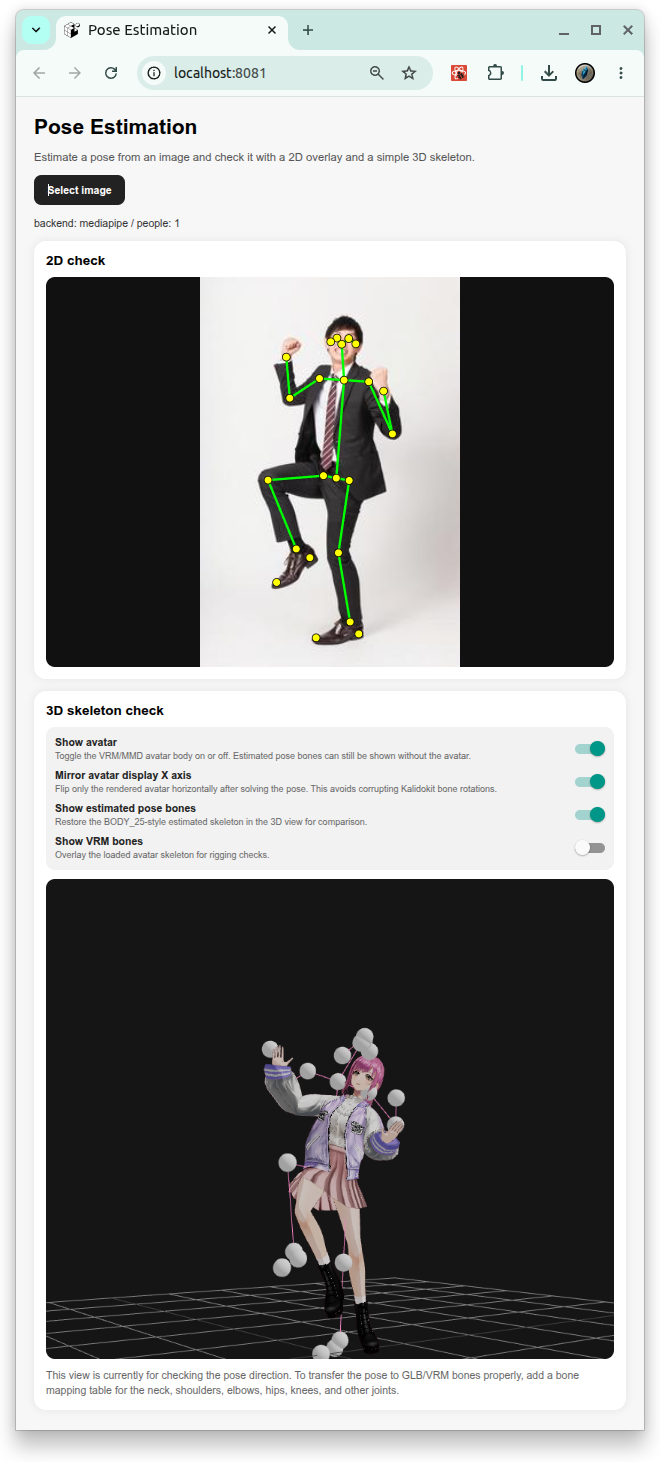
- “Select image” दबाएँ।
- एक image चुनें।
- image पर overlay किए गए 2D keypoints देखें।
- नीचे वाले “3D skeleton check” view में pose direction देखें।
Tests
backend tests चलाएँ:
docker compose -f docker-compose.test.yml run --rm backend_test
frontend smoke test चलाएँ:
docker compose -f docker-compose.yml -f docker-compose.test.yml run --rm frontend_test
License
- Apache License 2.0