Pixiv Encyclopedia Viewer History Extractor
Pixiv Encyclopedia Viewer History Extractor




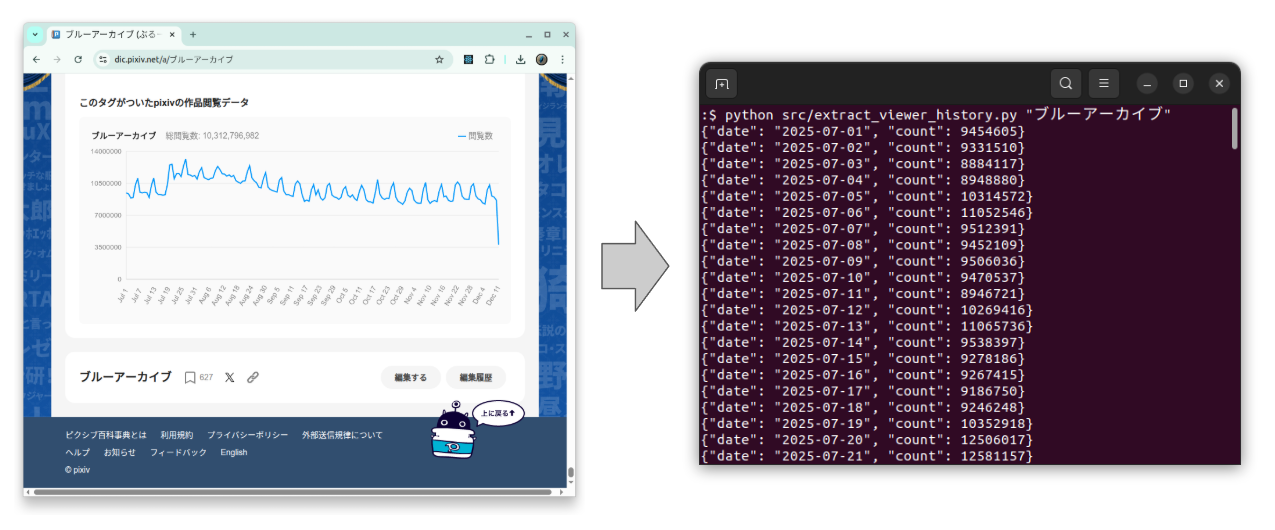
An Extraction Tool for Pixiv Encyclopedia Viewer Count History
Japanese README
日本語版はこちら README.ja.md.
Overview
Extract daily view history data from a Pixiv Encyclopedia (pixiv百科事典) article.
Pixiv Encyclopedia viewer history is a nice real-world time-series dataset.
It often shows:
- Weekly seasonality (weekday vs weekend traffic)
- Occasional spikes caused by events or social media buzz
You can use the extracted CSV as sample data for:
- Time-series visualization and smoothing
- Seasonal decomposition
- Forecasting models (ARIMA, Prophet, etc.)
⚠️ Unofficial tool
This project is not affiliated with or endorsed by Pixiv.
Please follow Pixiv’s Terms of Use and robots.txt when using this script.
Features
- Fetch by article title (e.g.,
"ブルーアーカイブ") directly from Pixiv Encyclopedia - Or read from a local HTML file
- Output JSON Lines to stdout
(one{"date": "...","count": ...}per line) - Optional CSV export via
--csv output.csv
Requirements
- Python 3.9+
- Dependencies:
requestsbeautifulsoup4
Usage
0. Create virtual environment
python3 -m venv env
source env/bin/activate
pip install -r requirements.txt
1. Fetch by article title
python src/extract_viewer_history.py "ブルーアーカイブ"
This will:
- Download
https://dic.pixiv.net/a/ブルーアーカイブ - Parse the embedded JSON
- Print one JSON object per line to stdout:
{"date": "2025-07-01", "count": 9454605}
{"date": "2025-07-02", "count": 9331510}
{"date": "2025-07-03", "count": 8884117}
...
You can redirect it to a file:
python src/extract_viewer_history.py "ブルーアーカイブ" > ブルーアーカイブ.jsonl
2. Export as CSV
Use the --csv option to write a CSV file while still printing JSON to stdout:
python src/extract_viewer_history.py "ブルーアーカイブ" --csv ブルーアーカイブ.csv
Example CSV content:
date,count
2025-07-01,9454605
2025-07-02,9331510
2025-07-03,8884117
...
3. Use a local HTML file
If you have already saved the article HTML:
python src/extract_viewer_history.py ブルーアーカイブ.html
python src/extract_viewer_history.py ブルーアーカイブ.html --csv ブルーアーカイブ.csv
The script will detect that ブルーアーカイブ.html is a file and will parse it instead of fetching from the web.
4. Test
pip install -r requirements.test.txt
pytest
5. Deactivate environment
deactivate
Notes / Limitations
- No rate limiting is implemented; please:
- Use it responsibly
- Avoid sending many requests in a short time
- This is a simple utility script, primarily intended for personal analysis or research.
License
- Apache License 2.0